End-to-End Architecture of an AI Automated Document Processing System
The use of AI for Automated Document Processing is seeing significant growth across industries, be it for finance, healthcare, insurance companies or CA firms. The document AI market was valued at 14.66 billion in 2025 and is expected to reach USD 27.62 billion by 2030, growing at a CAGR of 13.5%. (source: MarketsandMarkets )
The statistics highlight the increasing demand for AI for document processing, intelligent data extraction and automation across industries.
Let’s look at some other reports to highlight various use cases of AI for automated document processing.
The market value of AI for invoice management was USD 2.8 billion in 2024. It is expected to reach USD 47.1 billion by 2034, growing at a CAGR of 32.6% from 2025 to 2034 (Source: Market US report).
As organisations grow, they need to handle a high volume of documents and unorganised data. Manually processing often leads to delays and errors when the workload is high.
AI Document processing is emerging as a critical solution for improving efficiency with fast document processing and streamlining workflows automatically.
The modern AI Automated Document Processing system is evolving by integrating advanced technologies like RAG and federated learning to enhance decision-making and improve accuracy. The combination of ML, AI, RAG and OCR technology enables the team to-
- Generate an accurate report
- Ensure smart document comparison
- Analyse documents for compliance and regulatory checks
- Reduce risks and fraud associated with document processing
- Boost client/customer satisfaction with improved speed
How does this AI-based Automated Document Processing actually work? Here is a breakdown of the Document Automation System architecture.
Key Components of AI- based Automated Document Processing System
AI- based Automated Document Processing System architecture is designed to automate complex document workflow and overcome the limitations and challenges with traditional document processing. Here is a detail of the Automated Document Processing workflow.
The Document Ingestion Layer
This layer acts as a centralised system that accepts documents either through manual user uploads or the system is integrated with multiple systems and communication channels to capture documents and records.
For direct document access, the user accesses the application via a web browser and uploads the required documents in the form of PDFs, images, or scanned texts. Here is how this layer functions-
- The user enters the login credentials and authenticates himself
- After successful login, the user can access the portal and upload the required document or invoice
- The user can view the status of the records, manage, and review the processed documents.
- The interactive dashboard enables users to analyse reports and make important decisions.
Key Features:
- User-friendly: The user interface is user-friendly that allows users to easily navigate across the application.
- Strong Access Mechanism: The security layer is crucial to avoid unauthorised access and edits. The layer is thus built using strong authentication mechanisms and access control to prevent fake document uploads.
This layer is integrated with multiple enterprise systems and communication channels to fetch documents from emails, WhatsApp, etc automatically. This enables organisations to automate high-volume document processing workflows.
The system is connected to various platforms such as ERP, accounting software, CRM platforms, emails, vendor portals, cloud storage systems and third-party business applications using APIs, webhooks, middleware connectors, or RPA bots.
The ingestion layer continuously monitors the systems connected to it and automatically identifies newly uploaded documents. The records are captured and transferred to the processing engine.
Integration is done cautiously to ensure secure data transfer, routing, and encrypted communication.
Interaction of AI with OCR Processing Engine
The function of OCR is to scan text or image-based documents and convert them into machine-readable text. The limitation of traditional OCR is that it accurately fetches records from structured records. AI with OCR adapts to the varying layouts, structures, patterns, and formats.
This layer combines computer vision, deep learning, OCR, and AI to ensure accurate text extraction, fetch records in table format, and detect signatures and recognise handwriting and multi- language.
AI-powered OCR continuously improves with the training datasets and feedback to extract an accurate text.
Intelligent Data Extraction and Parsing
Once the system receives the extracted text from the document, it checks for useful business data. AI helps identify and classify document types automatically. Here is how the module works-
- Scans the text to identify patterns and specific keywords
- Identify important fields
- Organised the extracted text into a structured data format.
This process is called information extraction or text parsing. The system uses ML to recognise patterns to identify data, even if the format differs. Say, it can identify the invoice number and invoice code to be equal with respect to relevant values.
Key benefit: This layer eliminates the manual sorting and indexing activities.
Database Storage Module
This module is responsible for storing the extracted document data in a structured format in the database. The database contains multiple tables for managing the information. AI helps automate the process and add the relevant data to each table.
It may include the login ID, the documents table, the invoice table, clients’ communication data, and the amount, along with their respective fields.
The database allows the system to store and retrieve document information efficiently. The dashboard interface allows users to view documents and check their status.
Data Validation Engine
The system validates the extracted data against the historical record, business rules, and connected enterprise databases. This layer is responsible for verifying records for accuracy, consistency, and authenticity before they are passed on to the next layer of workflow.
In case the system detects any unusual records or suspicious activity, the document is automatically flagged for review.
Key Objective:
- Detect Missing Data: Identify any missing values, duplicate entries, incorrect mappings, suspicious transactions, or compliance-related anomalies before they are passed further for final processing and approvals.
- Prevent Fraud: Data validation helps reduce operational cost, prevent unauthorised activities and ensure that only accurate data enters the enterprise system.
Workflow Automation Layer
Once the extracted data is validated successfully, it is passed to the AI workflow automation layer for further processing and approvals. This layer is most crucial for the document automation system. AI helps automate repetitive workflows and reduce workload.
The workflow engine routes the documents to the relevant location automatically based on predefined business logic and document type. The system can also trigger approvals and process tasks based on the workflow configuration. For example, after the successful validation –
- High-value payment approvals are routed to the concerned team for review before the payment is processed.
- Approved invoices are automatically pushed for payment
- Compliance-related concerns are automatically sent to the audit team
- Records that fail in the validation stage are automatically sent for manual review
The workflow automation layer continuously tracks the progress and triggers a notification in case of any pending action or missed timeline.
The system is integrated with ERP, accounting software, CRM platforms, banking applications, and other systems to execute business operations automatically.
Key Benefits-
- Automate approval workflows
- Real-time workflow monitoring
- Automate repetitive business operations
- Improve Processing Speed
- Enhance Operational Visibility
Email Notification Module
This layer automatically sends documents to the vendors, clients or businesses via email. The system generates an email automatically for the document stored in the database, containing all required details. Here is how this module works-
- Create an email message for the invoice information
- Connect to the SMTP mail server
- Send an email to the sender’s email address.
Benefits-
- Automated email processing enables the team to avoid delays and quickly release documents as soon as they are processed
- It also helps save time in manual processing and avoid errors in sending documents, especially with a large number of clients to deal with.
Interactive Dashboard
Dashboards are integrated with the automated document processing system to provide a visual interface to view the status and progress of documents. AI helps provide real-time updates and makes the dashboard more interactive.
Key Features:
- Provides a clear and organised view of invoice records
- Reflects the status of the process
- Allows authorised users to review the uploaded documents
- Enable users to manage and monitor documents in real time
Managing high-volume documents manually is no longer an effective approach for organisations that handle high-volume documents monthly. It also limits the organisations ‘ ability to scale and maintain efficiency as they grow with more clients and customers.
AI-powered Automated Document Processing Systems is thus the most effective solution to meet the modern needs and improve operational efficiency.
Looking to implement an intelligent document automation solution for your organisation? Connect with the PrimaFelicitas team to discuss architecture planning, AI integration and workflow automation strategies.
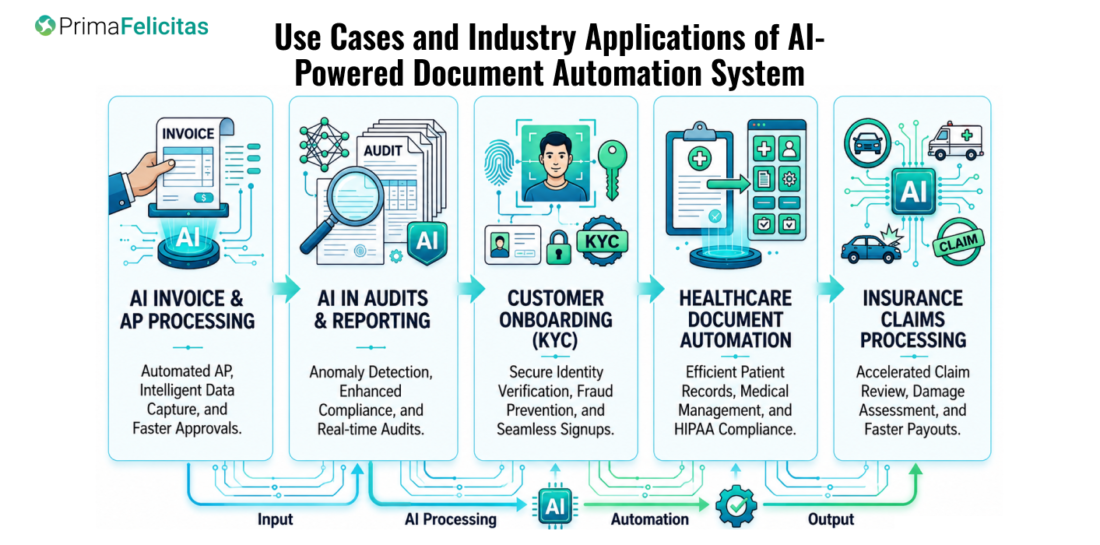
Use Cases and Industry Applications of AI-Powered Document Automation System

Intelligent Document Processing is transforming the way organisations manage large volumes of documents across various industries. By automating document-centric workflows, they can save much of their time and make the entire process more efficient.
AI Invoice and Accounts Payable Processing
One of the most widespread applications of a document automation system is Accounts Payable and invoice processing. Organisations receive thousands of invoices monthly, often in various formats and layouts. This AI- powered document automation system extracts relevant data fields such as invoice numbers, dates, total, purchase orders and contracts, etc., for further processing.
This automation reduces manual data entry, accelerates payment cycles, minimises late payment penalties and improves supplier relationships.
AI in Audits and Regulatory Reporting
Regulated industries such as banking, CA firms, insurance, and healthcare need to process large volumes of documents daily for audits and regulatory reporting. Document Automation System helps manage a large volume of documents, scans and extracts information from heavy documents, routes them and organises them automatically. The system is designed with a layer of tight security to avoid risks while accelerating audits and regulatory reporting speed.
Also Read: AI-Driven Accounts Payable Architecture: Automate for Faster Financial Operations
Customer Onboarding and Know Your Customer (KYC)
Organisations use an AI-powered document verification system to streamline customer onboarding by automatically extracting and verifying information from identity documents, supporting documents and application forms.
This helps them validate customers’ identity in less time, detect fraud early through intelligent document processing and ensure that the process adheres to regulatory guidelines.
An AI-powered document verification system is an effective solution for high-volume customer onboarding and the KYC procedure. It also helps boost customer experience with fast processing while ensuring a secure process.
Document Automation System in Healthcare
Healthcare is another industry where people manage a high volume of documents in the form of patient records, lab and diagnosis reports, referral documents, insurance claims and medical bills.
Document automation systems enable healthcare firms to manage patients’ documents effectively, organise records, and automate bill and insurance claim checks with accuracy. AI also supports healthcare professionals for clinical decision-making and ensures that the patients’ data is easily accessible.
Insurance Claims Document Processing Using AI
Insurance companies actively use the document automation system to automate claims document management, extract data, and analyse it and for smart document comparison.
The system extracts data from forms, medical reports, and claims-related documents and validates them against the policy terms.
This accelerates the speed of claims closure and helps improve patient satisfaction with fast response and processing.
Also read: Specialised AI Agents in Healthcare: Improving Efficiency Through Intelligent Automation
From invoice processing and audits to healthcare records and insurance claims, AI-powered Document Automation Systems are transforming enterprise operations with real-time processing and intelligent workflows.
At PrimaFelicitas, we help organisations design and develop secure, scalable, and AI-driven document automation platforms tailored to business requirements. Connect with our experts to explore your automation roadmap and integration strategy.
Wrap Up!
An AI-Powered Automated Document Processing System is one of the most useful applications of AI, as it frees the team from processing heavy and high-volume documents manually. Integration of OCR, Machine Learning (ML), NLP and RAG makes it a robust and reliable digital solution to extract and interpret documents, as well as make decisions automatically.
For organisations handling high-volume invoices and documents, the automated Document Processing System using AI proves to be the most effective digital solution. It saves time, enables the team to handle more documents in less time and helps them scale in the long run.
While the integration of the Automated Document Processing Systems is significant, organisations must ensure the deployment of secure systems for data privacy and develop a scalable solution for the future.
Considering implementing Automated Document Processing Systems for your organisation? Connect with our team at PrimaFelicitas to discuss the strategic plan, integration frameworks, and end-to-end development roadmap.
Post Views: 21